

Blog · Defender Diaries
“We’ve Got Antivirus” Isn’t a Security Strategy Anymore
Ask most business owners what protects their computers and you’ll get the same answer. “We’ve got antivirus.” Said with the same confidence as someone telling you their smoke alarm has batteries in it.
The trouble is, the thing they’re picturing (a program quietly scanning files for known viruses) was built for a threat that barely exists anymore. Modern ransomware doesn’t behave like a virus. It behaves like a person. It logs in, looks around, and only starts causing damage once it understands exactly where your data lives.
In Part 1 of this series, we watched a phishing click get stopped by Defender before it reached a fake login page. This time we’re looking at what happens once an attacker is already past the front door, and why “antivirus” was never designed to deal with that.
What Traditional Antivirus Was Actually Built For
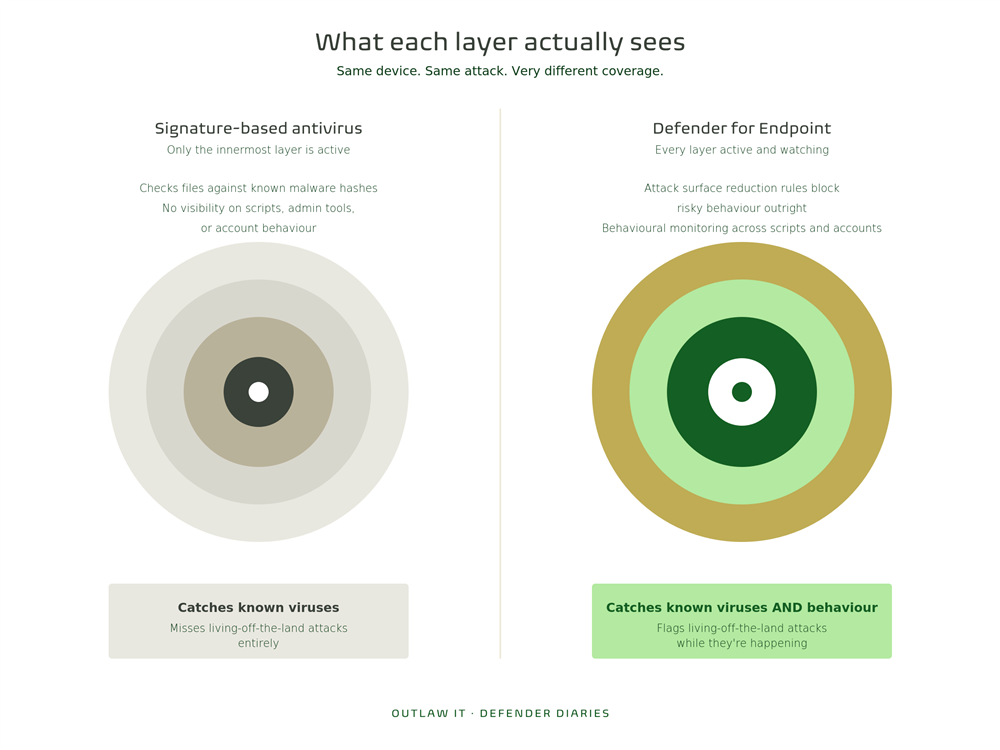
Classic antivirus works on signatures. Every known virus has a kind of fingerprint, a specific pattern in its code, and antivirus software checks files against a huge list of those fingerprints. If a match turns up, it gets blocked.
This works well against one specific kind of threat: malware that’s been seen before. A known file, a known hash, a known pattern.
It was a genuinely good model in an era when malware spread through infected floppy disks and dodgy email attachments with obvious .exe files attached. That era is mostly over.
What Modern Attacks Actually Look Like
Here’s the part most business owners have never seen described plainly.
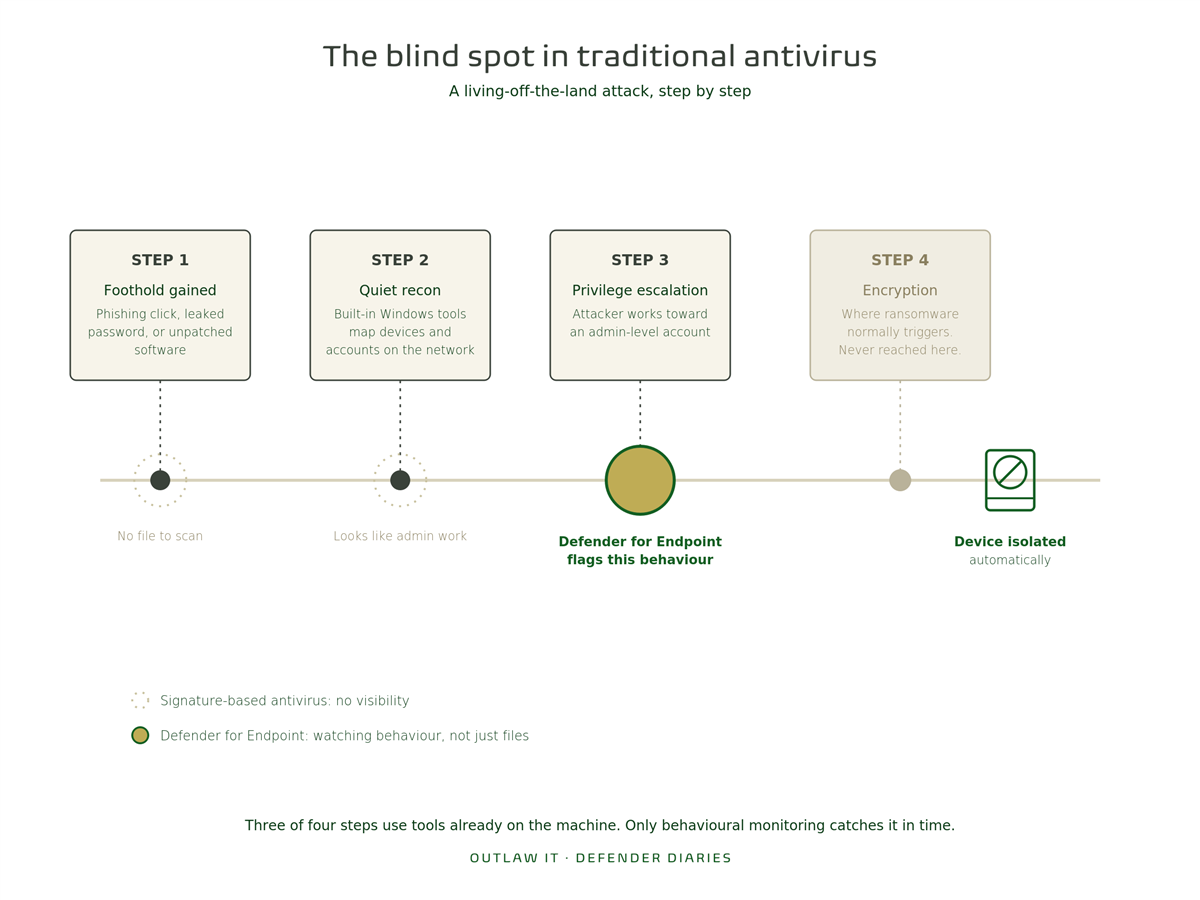
A large share of modern ransomware attacks don’t drop a suspicious file onto the computer at all. Instead, they use tools that are already sitting on every Windows machine: PowerShell, Windows Management Instrumentation, legitimate admin utilities. Security researchers call this “living off the land,” and it’s exactly what it sounds like. The attacker builds their attack out of tools your IT team uses every day, so there’s no obvious virus for a signature-based scanner to catch.
A typical sequence looks something like this:
- An attacker gains a foothold on one device (often through a phishing click, a leaked password, or an unpatched piece of software)
- They use built-in Windows tools to look around the network quietly, checking what other devices and accounts they can reach
- They gradually gain higher-level access, often targeting an admin account
- Only once they’ve mapped out where your valuable data lives do they trigger the actual encryption
None of those first three steps involve a virus file landing on a machine. Traditional antivirus has nothing to flag. The file scanner isn’t wrong, it’s just looking for something that was never going to show up.
What Actually Catches This
This is where the conversation about “antivirus” needs to change into a conversation about endpoint detection and response, or EDR. Microsoft Defender for Endpoint (included in Microsoft 365 Business Premium) works on a completely different principle: instead of only checking files against a known list, it watches behaviour.
A few examples of what that looks like in practice:
Attack surface reduction rules. These block specific risky behaviours outright, like Office applications launching child processes, or scripts running from email attachments, regardless of whether the file itself is “known bad.”
Behavioural monitoring. Defender for Endpoint watches for patterns that look like an attack in progress: unusual PowerShell activity, credential dumping attempts, a device suddenly trying to access dozens of other machines on the network in quick succession.
Automated investigation and remediation. When something suspicious is flagged, Defender doesn’t just log it and wait for a human. It can automatically isolate the affected device from the network while your IT team investigates, containing the problem before it spreads.
Threat and vulnerability management. Rather than waiting for an attack, this continuously checks your devices for the unpatched software and risky configurations that attackers rely on to gain that first foothold in the first place.
None of this depends on the attacker’s tools being “known malware.” It depends on what they’re doing looking wrong, which it almost always does if you’re watching for it.
The Gap We See Most Often
Here’s the uncomfortable bit. Every Microsoft 365 Business Premium customer already has access to Defender for Endpoint’s full capability. Most are using a fraction of it.
In the tenants we audit across Nottinghamshire and the Midlands, a common pattern shows up again and again:
- Attack surface reduction rules exist in Microsoft’s toolkit but were never turned on
- Devices are enrolled in basic antivirus mode without the behavioural and EDR features activated
- Nobody is reviewing the alerts Defender is already generating, so genuine warnings sit unread
- Vulnerability management isn’t being used, so known unpatched software sits there as an open door
Businesses are paying for a modern detection and response platform and using it like a 1990s virus scanner. The tools to catch a living-off-the-land attack are already included in the license. They’re just switched off.
The Real Lesson Here
“We’ve got antivirus” was a reasonable answer to a threat that mostly stopped mattering years ago. The attacks actually hitting small businesses now are quieter, slower, and built from tools that look completely legitimate right up until the moment they aren’t.
What matters isn’t whether you have a security product installed. It’s whether that product is watching behaviour, not just checking a list, and whether anyone’s actually looking at what it finds.
Is Your Defender Set Up to Catch This?
If you’re a Microsoft 365 Business Premium customer, the capability to catch a living-off-the-land attack is very likely already sitting in your license, unused. The question is whether attack surface reduction rules are switched on, whether alerts are being reviewed, and whether anyone would notice if an attacker was already quietly mapping your network right now.
This is exactly what we check in our Free M365 Assessment, a no-obligation review of your current Microsoft 365 environment, including how your Defender for Endpoint configuration actually holds up against modern attack techniques.
Next in Defender Diaries, Part 3: how ransomware actually spreads once it’s inside your network, and the settings that stop it moving sideways.