

Blog · Defender Diaries
How Ransomware Spreads Once It’s Inside Your Network
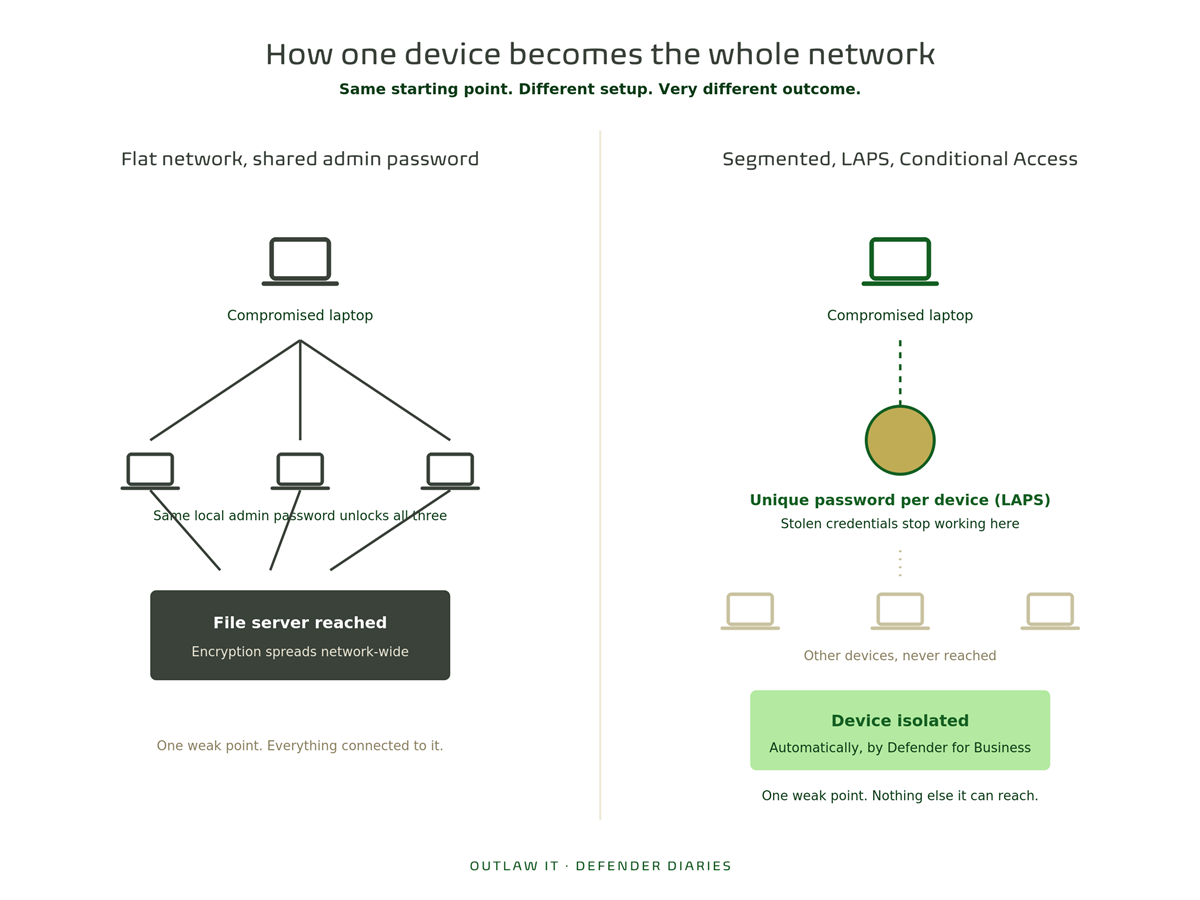
In Part 1 of this series, we watched a phishing click get stopped before it reached a fake login page. In Part 2, we looked at what happens if an attacker gets past that first layer using tools already sitting on the machine. This time we’re picking up where that leaves off: one device is compromised. What happens next decides whether this is a minor incident or a business-wide one.
The honest answer is that a single infected laptop shouldn’t be able to take down an entire network. Whether it can usually comes down to a handful of specific settings, not luck.
What Lateral Movement Means
Once an attacker has a foothold on one machine, the next goal is almost never to encrypt that machine straight away. One laptop is a small prize. The real target is everything that laptop can reach: file servers, other devices, admin accounts, backups.
Getting from “one compromised device” to “the whole network” is called lateral movement, and it usually relies on a few very ordinary weaknesses:
- The same local admin password on every device. Many small businesses image every laptop the same way, which often means every machine shares an identical local administrator account and password. Compromise one device, and the attacker effectively has admin rights on all of them.
- Flat networks. If every device, from the receptionist’s PC to the finance server, sits on the same network with no segmentation, there’s nothing to stop an attacker moving from a low-value machine straight to a high-value one.
- Legacy protocols left switched on. Older protocols like SMBv1 were never built with modern security in mind and are a well-known route for malware to spread between machines automatically.
- Stolen credentials that still work everywhere. If a username and password are all that’s needed to log into anything on the network, one successful phish or credential dump gives an attacker the keys to far more than the original device.
None of these require anything exotic on the attacker’s part. They’re just taking advantage of how the network was set up.
What Stops It
Microsoft 365 Business Premium includes several tools that directly address each of these weaknesses. The capability is there. Whether it’s switched on is a different question.
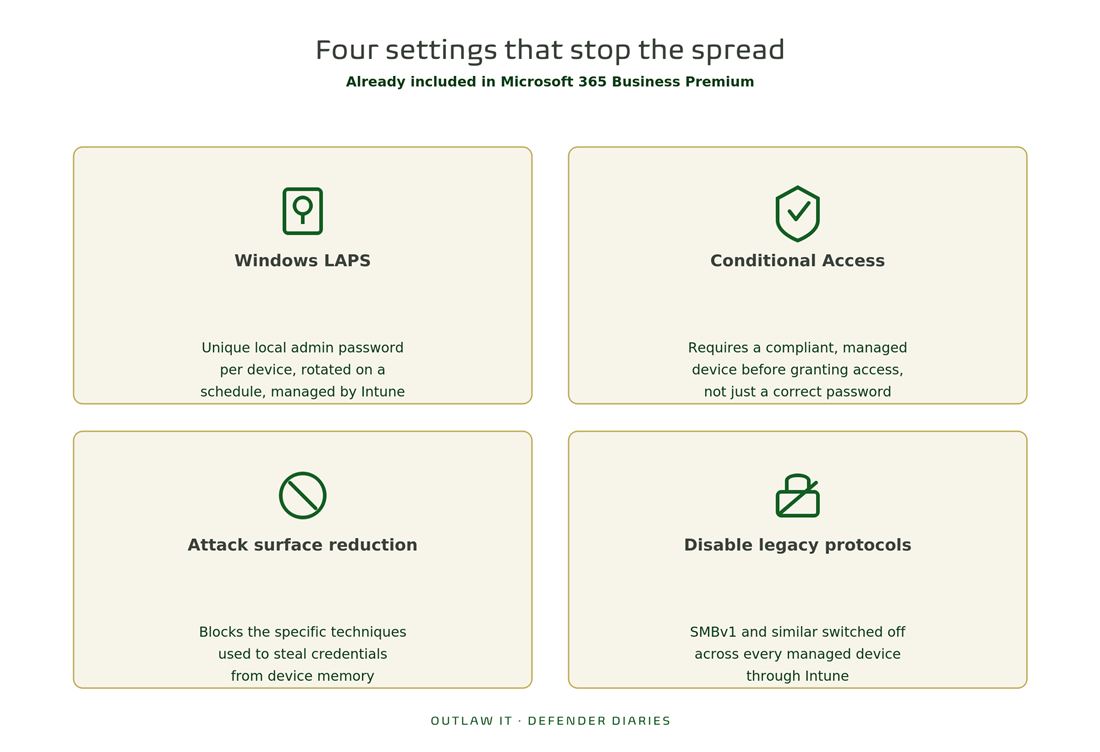
Windows LAPS (Local Administrator Password Solution), managed through Intune. Instead of every device sharing one local admin password, LAPS automatically assigns a unique, randomly generated password to each device and rotates it regularly. Compromising one machine’s local admin account no longer means compromising every machine’s.
Conditional Access requiring compliant, managed devices. Rather than treating “correct username and password” as enough to access company data, Conditional Access can require that the device itself is enrolled in Intune, meets your security baseline, and isn’t showing signs of risk. A stolen password alone stops being sufficient.
Attack surface reduction rules. Covered in Part 2, these block specific high-risk behaviours outright, including several of the techniques attackers use to steal credentials from memory (LSASS) in order to move to the next machine.
Disabling legacy protocols like SMBv1. This can be enforced through Intune configuration profiles across every managed device, closing off one of the most common automatic-spread mechanisms rather than leaving it as a manual, easy-to-forget setting.
Automatic device isolation through Defender for Business. Also covered in Part 2. If something suspicious is detected, the affected device can be cut off from the network automatically, containing the problem before it has a chance to reach anything else.
Why This Often Isn’t Switched On
Most of these settings aren’t complicated to configure. They’re just easy to skip when a network was set up quickly, or has grown over several years without anyone going back to review it.
A common pattern in the tenants we look at:
- Devices were imaged from the same template, local admin passwords included, and never revisited
- Conditional Access exists in the license but was never configured beyond basic MFA
- SMBv1 is still enabled because nobody has checked whether anything still depends on it
- Network segmentation was never part of the original setup, because the business was smaller when it was built
None of this is unusual. It’s just the kind of thing that quietly stays as-is until it matters.
A Compromised Device Isn’t the Same as a Compromised Business
A compromised device is close to inevitable at some point. A compromised business isn’t, if the network is set up so that one machine going down doesn’t take the rest with it.
The difference between those two outcomes usually isn’t a bigger budget or more advanced tools. It’s whether LAPS, Conditional Access, attack surface reduction, and basic network hygiene are configured, rather than sitting unused in a license you’re already paying for.
Is Your Network Set Up to Contain This?
If you’re on Microsoft 365 Business Premium, the tools to stop lateral movement are already part of your license. The question is whether local admin passwords are unique per device, whether Conditional Access is doing more than checking a password, and whether a single compromised laptop could reach your file server right now.
This is exactly what we check in our Free M365 Assessment, a no-obligation review of your current Microsoft 365 environment, including how well your setup would contain a compromised device.
Next in Defender Diaries, Part 4: what happens in the hours after a ransomware attack succeeds, and how to make sure that’s a bad day rather than a bad year.